Posts

Connection failed. server has reached maximum number of simultaneous connections (Error: RWI 00239)

All was working perfectly with  SAP BusinessObjects BI 4.3 Support Pack 3 Patch 4 Version: 14.3.3.4607 Suddenly we had: Connection failed. server has reached maximum number of simultaneous connections  (Error: RWI 00239) (Error:INF) Cause: The maximum number of server connections allowed has been reached. Action: Either raise the value of the maximum connections server parameter, or add another server instance. To modify the maximum connections value: Log on to Business Objects Enterprise Central Management Console (CMC). Click on Servers. Expand Server Categories, and click on Web Intelligence. Under Server name, double-click on WebIntelligenceProcessingServer. The Properties window appears. In Properties window, under Web Intelligence Processing Service, enter the value for Maximum Connections.   I setted it to 50 this fixed the issue

SAP Dashboard Error - Cannot find the BusinessObjects Enterprise report source. (LO 26608)

<!-- Google tag (gtag.js) --> <script async src="https://www.googletagmanager.com/gtag/js?id=G-NL0CYP13VZ"></script> <script>   window.dataLayer = window.dataLayer || [];   function gtag(){dataLayer.push(arguments);}   gtag('js', new Date());   gtag('config', 'G-NL0CYP13VZ'); </script> Cannot find the BusinessObjects Enterprise report source. (LO 26608) Environment SAP BO XI 4.1 SP 5 two nodes Cluster Windows Server 2012 While refreshing dashboard (based on Live Office connection) from BI Launchpad with a no administrator user the above exception was erased. SAP says: Cause The document is not available; for example it does not exist, or it has been removed. Action Check the report path from CMS and use SetLocation in Live Office to re-define the report source. Otherwise, check if the user has sufficient rights to view the object. Solution In our case  we fixed this problem was to remo...

Webi Error XI 4.1 - Your security profile does not include permission to edit this documents (WIS 30252)

Webi Error XI 4.1  - Your security profile does not include permission to edit this documents (WIS 30252) Symptom Below mentioned mentioned error message is displayed while performing drill in a Web Intelligence(WebI) report by non-Administrator user: "Your security profile does not include permission to edit this documents (WIS 30252)". Environment SAP Business Objects XI 4.1 SP 4 - two node cluster Windows Server 2012 R2 Database  Teradata 14 Reproducing the Issue 1.  Login to WebI Rich client/BILaunchPad using Administrator account and create a new Webi report on a universe. 2.  In the query panel select a dimension and a measure. 3.  Save report to the repository. 4.  Enable "Drill" in the report. Administrator is able to successfully perform drill in the report. 5.  Logout and login to BIlaunchPad using Non-Administrator user and open the same report in View mode. 6.  Try to perform Drill in the repor...

Information Design Tool XI 4.1 SP 5 - Problem on opening a session as designer user not administrator

Image
Information Design Tool - Problem on opening a session as designer user not administrator  Environment IDT 4.1 SP 5  - 2 nodes  Cluster  Windows 2012 R2   Our customer has a problem while opening session on Information Design Tool loggin on with a not administator  user. We found the solution on SAP Knoledge base in the following note. 1916649 - Information Design Tool session terminated right after login for certain users https://websmp230.sap-ag.de/sap(bD1lbiZjPTAwMQ==)/bc/bsp/sno/ui_entry/entry.htm?param=69765F6D6F64653D3030312669765F7361706E6F7465735F6E756D6265723D3139313636343926 Reproducing the Issue In the CMC deny the "View Objects" and "View objects that the user owns" access level on "UserA" 's Inbox Log in IDT using "UserA" Notice that the session is terminated and an error message might appear Cause The user has not been granted right access into its BI Inbox Solution Make sure the users have view ...

BO XI R 3.1 - Changing Business Objects Server Hostname

If you need to change the hostname of BOE XI 3.1 server machine follow these steps 1.     Disable all job servers so schedules are protected until you are confident your changes have been executed correctly. 2.     Change the machine name. Restart the server and 3.0 backend is solid and working. 3.     Reconfigure the application servers. Stand alone or not, these may need to be reconfigured: a. Java based (Tomcat, Jboss, etc): - Make a copy and then edit the WEB.XML files which in Tomcat are under the following directories: 1. /webapps/CmcApp/WEB-INF 2. /webapps/InfoViewApp/WEB-INF - Edit each of the Web.xml files with a text editor Navigate to the context-param key. Edit to read as follows: CMS NEWHOSTNAME b. .NET based (IIS) - Create a copy and then edit the WEB.CONFIG files which are in the following directories: 1. \BusinessObjects Enterprise 12.0\WebContent\InfoViewApp\CmcApp\ 2. \BusinessObjects Enterprise 12.0\WebContent\InfoView...

Desktop Compatibility Pack (DCP) with SAP BI Platform 4.1 SP1

Image
Desktop Compatibility Pack (DCP)  The “Desktop Intelligence Compatibility Pack” has been delivered in Fix Pack (FP) 6.1 which is to be installed over Desktop Intelligence XI 3.1 SP6 desktop product.  When installed, it  allows the Desktop Intelligence reports, users, universes and database connections to be managed by the BI 4.1 platform.  The goal is to allow Desktop Intelligence users and content to move to BI 4 as easily as possible. The Desktop Intelligence Compatibility Pack helps in scenarios with reports are difficult or costly to convert to Web Intelligence. Don't bet on "DCP" to keep your Deski documents alive, this feature is only there to facilitate your migration project and nothing more. We must not forget that a migration project is often associated with a project to convert your Deski (.REP) documents to Webi (WID). The  steps to follow for installing are the following: 1.       Install SBOP Enterprise Cl...

Webi 4.0 Error: c3_qtds_error_it_505

Image
Error c3_qtds_error_it_505 Envirnonment SAP BO 40 SP 8 Db Oracle 10 i The problem was that no group had the right at least to view this connection So in order to solve the error we gave the view right to the specific group Another solution you can try to solve this problem requires to follow these steps: Log on to CMC->Universe Connection->Manage->Top level Security Assign the Data access right in Relational connection Choose your connection  Data Access(Owner right) Use Connection (Owner Right)

Soon: troubleshooting with UMT & Promotion Management

Dear readers soon I will write down for you troubleshooting  with Upgrade Management Tool  and Promotion management while migrating from XI R3.1 SP 4 to BI 4 sp8. Best regards Giuseppe

CCM Error: Visual C++ Runtime library

Image
CCM  Error : Visual C++ Runtime library Environment  BI 4 SP 8 Windows Server 2008 R2 sp1 On opening the CCM tool from the BO server it crashed more times. In our case we just restared the Server and this solved the problem.

Error:RWI 00226 - Cannot initialize Report Engine Server. (Error:RWI 00226)(Error:INF)

Image
 Cannot initialize Report Engine Server. (Error:RWI 00226) (Error:INF) Environment BO XI R3.1 SP 4 Windows Server 2008 R2  sp1  While rescheduling a Webi report one of our users experienced the error in exam. Solution: In our case we just restared WebIntelligence group servers: See also: SAP BI 4.0 Errors List XI R 3.1 errors solutions

HTTP Status 500 - BI Launchpad URL after moving BI 4 server under Windows Domain

After moving the server under Win Domain both cmc and bi launchpad url erased the following error: Environment  SAP BI 4.0 SP 8 Microsoft Windows Server 2008 R2 HTTP Status 500 - type Exception report message description The server encountered an internal error () that prevented it from fulfilling this request. exception java.lang.NullPointerException         com.businessobjects.servletbridge.customconfig.Config. (Config.java:37)         com.businessobjects.servletbridge.customconfig.ConfigReader.getConfig(ConfigReader.java:274)         com.businessobjects.pinger.TimeoutManagerFilter.getSessionState(TimeoutManagerFilter.java:201)         com.businessobjects.pinger.TimeoutManagerFilter.doFilter(TimeoutManagerFilter.java:82) note The full stack trace of the root cause is available in the Apache Tomcat/6...

SAP BI 4 - Scheduling reports error - source file error. [Invalid argument]: [CrystalEnterprise.DiskUnmanaged]

 Scheduling reports error -  source file error. [Invalid argument]: [CrystalEnterprise.DiskUnmanaged]  Environment SAP BI 4 SP8  The BI 4 server is not in windows domain  but SIA service is runned by a domain user As suggested in other B.O. forum we perfomed the following steps: in CMC,  the Job Server  must use a NETWORK SERVICE user that has all the permissions to read/write, that run's as a service, log on as service account etc. ( admin user) ; user has full read/write access to the folders.  we are following  the UNC naming conventions while specifying the folder name including the sub-directories. So when we scheduled reports in order to create acrobat files on a network folder such as \\ServerName\Path  directories. the scheduled istance Fails  and raises the error source file error. [Invalid argument]: [CrystalEnterprise.DiskUnmanaged]  Solution: In our case we decide to...

Query Builder:queries for extract reports refreshed after o before a specific date

Query Builder:queries for extract reports refreshed after o before a specific date which could be useful to extract Webi reports in a specific folder with their name , owner, cuid, update date that have been refreshed since a date select si_name, SI_NAME, SI_OWNER,  SI_CUID, SI_PARENT_FOLDER_CUID, SI_UPDATE_TS FROM CI_INFOOBJECTS where SI_KIND='WEBI' and  SI_NAME NOT like '%Nuovo documento Web Intelligence%' and SI_INSTANCE='false' and SI_UPDATE_TS > '2013.01.01.00.00.00' and SI_PARENT_FOLDER = 851970 order by SI_UPDATE_TS asc Removing   SI_KIND='WEBI' you can extract also other document kind select si_name, SI_NAME, SI_OWNER,  SI_CUID, SI_PARENT_FOLDER_CUID, SI_UPDATE_TS FROM CI_INFOOBJECTS where  and SI_INSTANCE='false' and SI_UPDATE_TS > '2013.01.01.00.00.00' and SI_PARENT_FOLDER = 851970 order by SI_UPDATE_TS asc You can also exclude Administrator as owner  select si_...

ERR_WIS_30271 - Maximum binary output size limit reached

Maximum binary output size limit reached (ERR_WIS_30271) Environment SAP BI 4 SP 8 While exporting a huge  Web Intelligence report in Excel format BO raised the error: Max Binary file size limit exceeded. The document is too large to be processed by the server. Error WIS 30271  Cause This error message appears because BusinessObjects Enterprise allows documents to be saved with the limit specified for Web Intelligence Report server settings in the Central Management Console(CMC). To resolve the error follow the below steps: - Login to Central Management Console (CMC) using BusinessObjects Enterprise "Administrator". - Navigate to "Home >> Servers". - Click on "WebIntelligenceProcessingServer" to open its properties. Increase: Maximum Character Stream Size (MB) which specifies the maximum character stream size sent to the Web Intelligence client. Default value is 5. The valid range is 1 to 65535 MB. Bin...

CMC BI 4.0 -Visual Difference

Image
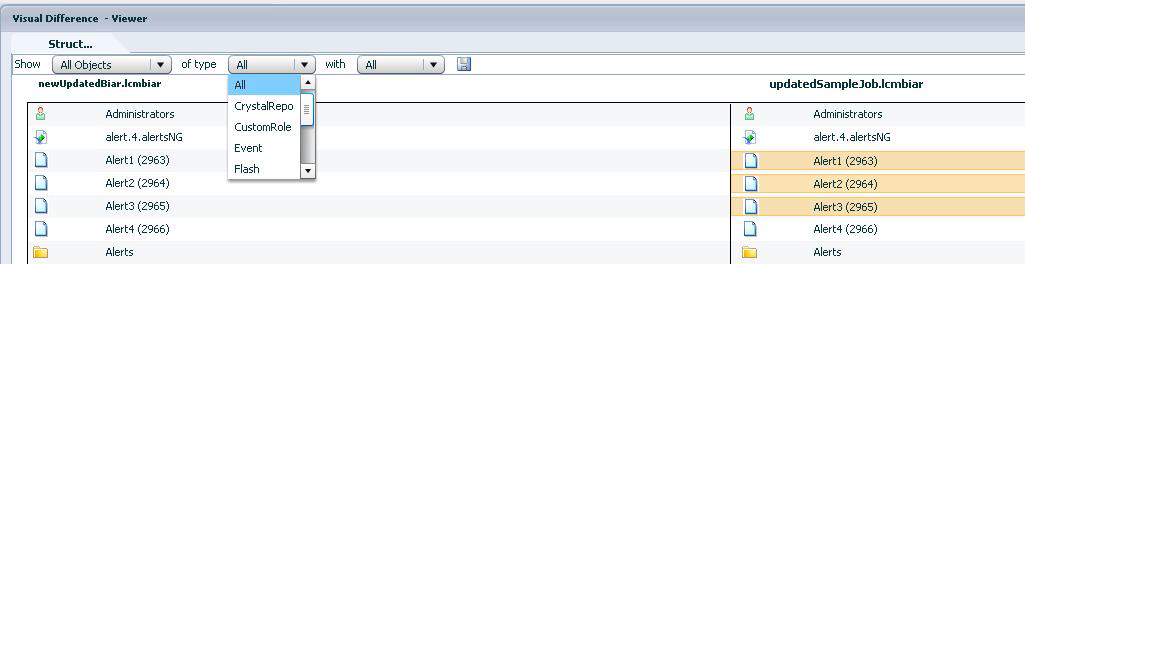
Visual Difference SAP BusinessObjects  Business Intelligence 4.0  - Version 4.0 SP2 Fixpack 5 Features - Visual Difference framework allows easy identification of changes - Comparison plug ins and viewers for each BI content type. (Eventually…) - LCMBIAR viewer answers: “How is this version of the BI application different from a previous version?” - Future service packs will provide comparison viewers for universes and other content types - For example, will answer: “What is different between these two versions of a universe? Can I easily merge changes?” - Impact Analysis - Understanding which objects in a universe have changed allows tester to focus only on reports which use changed objects. See Also Visual Difference Overview

Lifecycle management console features: Overrides - Visual Difference Overview

Lifecycle management console features SAP BusinessObjects  Business Intelligence 4.0  - Version 4.0 SP2 Fixpack 5 Lifecycle management console is now included in SAP BusinessObjects Business Intelligence servers install package. New Visual Difference capabilities allow easy identification of changes. Scriptable promotions supported via a command line interface. • Central Management Console– Visual Difference, Promotion and Version Mgmt. Lifecycle management is now in CMC: New Objects supported Categories based promotion is now supported. Server group promotion is supported however the servers are not promoted. LCM is now localized. • Job is copied • Job is migrated Update Source system of job when Overrides no longer job specific  Supports new improved BI platform Audit infrastructure There are 2 new features specifically for integrated deployments with BW: • SAP Authentication is now supported. • Integration with t...

BI 4 - LCMBIAR Overview - LCM Command Line Tool

LCMBIAR Overview - LCM Command Line Tool SAP BusinessObjects  Business Intelligence 4.0 Version 4.0 SP2 Fixpack 5 Allows to: Promote content between Development, Test, and Production SAP BusinessObjects BI 4.0 environments. Allows you to use scripting to automate the import of objects. Terms BIAR and LCMBIAR:   BIAR :(BI Archive) is a collection of any binaries associated with a BI object and its associated metadata, all materialized in a zip file. An LCMBIAR file is the same idea, but each object is stored in an individual BIAR. Considerations:  Lifecycle management tool is to promote objects from BI platform 4.x to BI platform 4.X version only.  Upgrades from a previous BO version to BI 4.0 must be done using the Upgrade management tool. To rollback a job you need to use the UI, not command line  LCM Command Line tool is not used when CTS+ is available. What can you do with LCM Cmd line tool?  Report d...

BI 4.0 - How to import or export a LifeCycle Manager BIAR file using command line utility

SAP NOTE 1634962 - BI4 - How to import or export a LifeCycle Manager BIAR file using command line utility If you need to export or import a Life Cycle Manager (LCM) BIAR in BI 4 using command line utility. Environment l SAP BusinessObjects Business Intelligence Platform (BI) 4.0 l SAP BusinessObjects Business Intelligence Platform (BI) 4.1 Follow these steps: 1. Create a Properties file: Start by creating a properties file (Example c:\lcm1.properties) as below. Note that the names of properties and lcmbiar files are not specific and can be anything. While the below examples are provided with Windows syntax, they are applicable to unix environments as well with minor changes to file path locations. Here is an example of a properties file to EXPORT to an lcmbiar file: exportLocation=C:/lcm1.lcmbiar action=export LCM_CMS=localhost:6400 LCM_userName=Administrator LCM_password=password LCM_authentication=secEnterprise Source_CMS=localhost:64...

WIS 00504 You do not have the rights to access data returned by this universe

Error: WIS 00504  Message: You do not have the rights to access data returned by this universe. See your business objects administrator  Non si dispone dei diritti di accesso ai dati restituiti da questo universo. (WIS 00504) Environment SA BI 4.0 SP 8 In order to solve this issue on refreshing a WebI  report check  user permissions at user/folder/object level Check   the access rights for all the universes and universe connections in this case for assigning rights to the user for Universe and connections, Login to CMC and go to Universes.  Select the universe which you are using,right click and select user security,check if your user has rights on that universe if not then use Add principals and assign rights to the user you are using.  Then go to Connections in CMC and select the connection which your universe is using and follow the same thing as done for Universes.  Moreover  on the rights tab and for ...

WIS 00005 Invalid Prompt definition

Invalid Prompt definition. See your Business Objects administrator. (Error: WIS 00005) Environment BI  4 SP 8 Cause The syntax in the prompt is not valid, or the prompt makes reference to an object that no longer exists in the universe. Action The universe designer can verify that the prompt syntax is correct, and check that all objects referenced in the prompt exist.